Flight Tracker Display
for Your Desk
Whether you want to watch aircraft from your desk or build your own display, here is your guide to live aircraft tracking and the best ways to show it.
What is a flight tracker display?
A flight tracker display - or aircraft tracking display - shows live aircraft data on a screen. Aircraft broadcast ADS-B signals with their position, altitude, speed, and identity. Ground receivers and global networks collect this data, and tracking platforms aggregate it so aircraft appear on maps and displays in real time.
Many tracking platforms work this way. Services like Flightradar24 aggregate signals from thousands of receivers worldwide to show aircraft positions, altitude, and routes on live maps. A flight tracker display can be as simple as that map on your phone, or a dedicated aviation desk display built to sit on your shelf.
Want to go deeper? Read more about how aircraft tracking works - ADS-B signals, tracking networks, and how displays show aircraft overhead.
What a display shows you
- Registration G-EUXG
- Airline British Airways
- Route LHR - JFK
- Altitude 34,000 ft
- Speed 487 kts
- Heading 285°
Updated every few seconds from live ADS-B feeds.
How flight tracking works
Understanding how planes appear on a live flight display helps you choose the right setup. Here is the technical picture.
ADS-B signals
Aircraft with ADS-B transponders broadcast their position, altitude, speed, and identity on 1090 MHz. Each broadcast is picked up by receivers within range - typically hundreds of kilometres.
Aircraft broadcasting position
Planes continuously broadcast. Commercial jets, cargo aircraft, military jets, helicopters, and light aircraft all transmit when equipped with ADS-B. No ground station needs to ask where they are.
Global tracking networks
Thousands of ground stations feed data into services like Flightradar24 and OpenSky. These networks stitch together a live view of global air traffic that powers apps and aviation desk displays alike.
Types of flight tracker displays
There are several ways to view live aircraft data, from free apps to DIY projects and dedicated hardware.
Apps
Flightradar24, FlightAware, and similar apps let you track flights on your phone or tablet. Great for checking a specific flight, but not ideal as a permanent desk display.
DIY Raspberry Pi
With a Raspberry Pi and a small screen, you can run open-source flight-tracking software. Flexible and educational, but requires setup and ongoing maintenance.
LED panels
Matrix LED panels can show flight data in a minimal style. Often paired with Raspberry Pi or Arduino projects - very customisable but more of a hobby build.
Dedicated displays
Purpose-built devices designed for desks and shelves. They combine a clock, flight data, and your location and viewing angle to show only aircraft you can actually see overhead.
AvClock - a dedicated flight tracker display
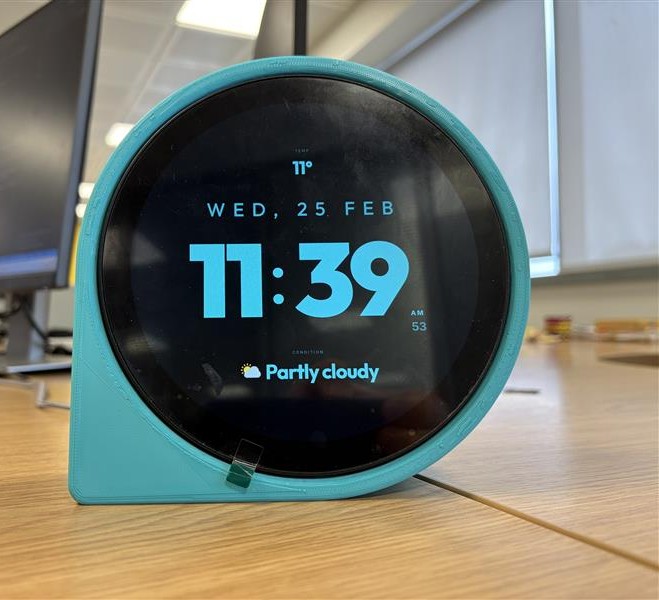
AvClock is a premium aviation desk display designed to sit on your shelf. Part clock, part live aircraft tracking display - always on, no app required.
It shows live aircraft data in a beautiful always-on format. Plug it in, connect to WiFi, and it starts tracking. Built in the UK. One-time purchase. No subscription.
- Location-aware: Set your coordinates and viewing direction once. AvClock shows only aircraft visible from your window.
- Real-time ADS-B: Commercial, military, helicopters, and light aircraft - all from live ADS-B feeds, updated every few seconds.
- Customisable: Multiple clock faces, colours, and typography to match your desk setup.
- No subscription: One-time purchase. Software updates over WiFi are included for the life of the product.
From £149.00 one-time payment (hardware)
Dedicated vs apps
Why a dedicated display beats an app
Apps are great for checking a flight on the go. For your desk, a dedicated flight tracker display offers more.
Always on
No need to open an app or keep your phone screen active. A dedicated aviation desk display runs continuously - your window to the skies above, whenever you glance over.
Glanceable
See the time and live aircraft at a glance. No tapping, swiping, or ad interruptions. A proper flight tracker display is designed to deliver information instantly.
Desk centrepiece
An aviation desk display is a premium focal point - not a phone you put down. Built for desks and shelves, it doubles as a clock and a conversation starter.
Who it is for
Who uses flight tracker displays?
Pilots
Many pilots keep a flight radar display at home to stay connected to the skies - checking traffic patterns, familiar routes, and aircraft types in their downtime.
Plane spotters
Plane spotters use flight tracker displays to identify aircraft overhead, track rare types, and enjoy live flight data without leaving the house.
Aviation enthusiasts
Anyone who lives under a flight path, works in the industry, or simply loves planes finds a dedicated aviation display a compelling addition to any space.
See it on your desk
AvClock shows you live aircraft from your own window. Hand-built in the UK, one-time payment, no subscription.
Common questions
Frequently asked questions
A flight tracker display - or aircraft tracking display - shows live aircraft data on a screen. It uses ADS-B data from global networks to display positions, altitudes, and routes of planes in real time. Displays range from smartphone apps to dedicated aviation desk devices like AvClock.
Aircraft broadcast their position and flight data via ADS-B (1090 MHz). Ground receivers and global networks collect this data, and services aggregate it so you can see aircraft on maps and displays. Most commercial and many general aviation aircraft are equipped with ADS-B transponders.
Apps are great for checking a specific flight or browsing a map on the go. A dedicated aviation desk display is always on, glanceable, and designed as a desk centrepiece. It does not require opening an app, and often combines a clock with live flight data.
No. AvClock hardware devices are a one-time purchase. There are no subscriptions or recurring fees. You buy the device, set it up, and enjoy live aircraft tracking on your desk. The only AvClock product with a subscription is BYOC - the software plan for people who already own compatible hardware.
BYOC (Bring Your Own Clock) is AvClock as a software subscription for your own hardware. If you already have a display (like a Raspberry Pi setup), you can subscribe from £3.99/month and point your browser at a unique URL to get the full AvClock experience without buying a device.
Your window to the skies above.
Right on your desk.
AvClock is a dedicated flight tracker display showing live aircraft visible from your window. Always on. No app. No subscription.
From £149.00 one-time payment (hardware)